
Behind the Archive: Building a Search Engine for 400 Publications
There's a particular kind of frustration that comes with knowing something exists in an archive but having no way to find it.
Somewhere in the Historical Society's decades of quarterly reviews, someone mentioned the exact street corner you're researching, or the exact family name you're chasing — but which volume? Which page? For years, the only honest answer was: start reading and hope.
That's the problem we set out to fix. Here's how it came together.
Starting with the raw material
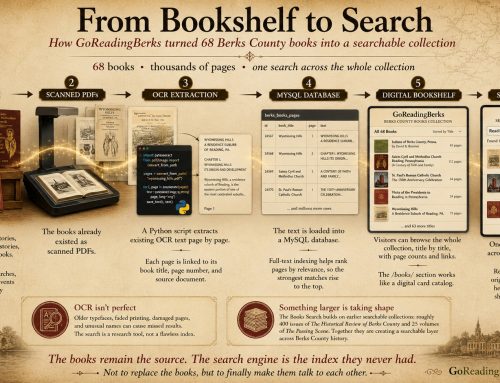
The Historical Review of Berks County has been publishing since October 1935 — roughly 400 issues, each around 50 pages, filled with genealogy, local biography, and the kind of granular neighborhood history that never quite makes it into a textbook. Every one of those pages exists as a scanned PDF, and every one of those PDFs already has a text layer buried inside it from an earlier OCR (optical character recognition) pass — decades-old software's best attempt at converting the scanned image of a page into machine-readable text.
The first job was pulling that hidden text out of 400 files and getting it somewhere searchable. That meant writing a small Python script using PyMuPDF, a library that can open a PDF and read off whatever text is embedded in it, page by page. Run it against a folder of PDFs, and it spits out a spreadsheet: one row per page, with the publication name, page number, source file, and the full extracted text.
The OCR wasn't perfect — and that turned out to be fine
Old OCR software wasn't kind to 1930s serif type, ornamental initial letters, or handwritten inscriptions. Early test runs came back with pages full of stray characters and mangled words — the kind of thing that looks alarming until you actually read it closely.
It turned out the damage was narrower than it first appeared. The article text — names, dates, places, the actual substance researchers care about — had come through largely intact. The garbling was concentrated almost entirely on decorative cover pages, ornamental capital letters, and handwritten signatures: places where the original scanner was trying to read artwork, not text, and never had a chance.
A little cleanup work — fixing character-encoding corruption left over from the original OCR pass — tightened things up further, but the core lesson held: a search tool doesn't need flawless text, it needs enough real words in the right places for a search to land on the right page.
From spreadsheet to searchable database
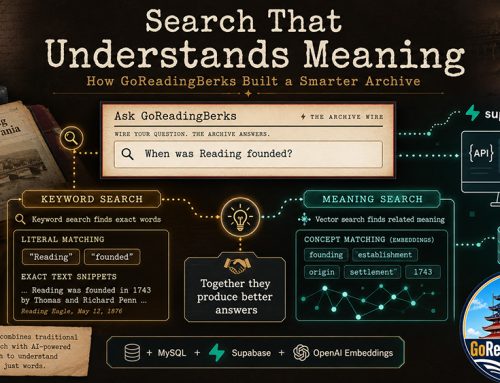
A spreadsheet with tens of thousands of rows isn't something you can search casually — you need a database built for it. That data went into MySQL, using a feature called FULLTEXT indexing, which lets a database understand "find pages that are about grape farming" rather than only "find pages that contain the exact string grape farming." It's the difference between a card catalog and a librarian who's actually read every book.
From there, a simple PHP page ties it all together: type a word or phrase, and it searches every indexed page, ranks the results by relevance, and shows a highlighted snippet of the matching text — with the option to expand any result and read the entire page right there, or jump to the original scanned document.
View the Search Demo
Rather than just describing how the system works, you can try a working demonstration yourself.
View the GoReadingBerks Historical Archive Search Demo https://goreadingberks.com/demo/demo.phpEnter a name, street, community, business, landmark, or historical subject and the system will search across the indexed publication pages and return the most relevant matches. The demo offers a glimpse of what becomes possible when decades of printed local history are transformed into searchable data.
Debugging in public
None of this arrived working on the first try, and it's worth being honest about that. Getting from "code that should work" to "code that actually works on a real hosting account" turned into its own small saga: a wrong database password produced a blank server error; a missing permission meant the database existed but the application wasn't allowed to talk to it; and an import that looked successful had actually landed the data in a brand-new, incorrectly structured table instead of the one the search page was built to read from.
Each of those took methodically checking logs, testing pieces in isolation, and ruling things out one at a time — the unglamorous, necessary work behind anything that looks simple once it's finished.
Where the files actually live
Hosting 400 PDFs takes real storage, and rather than filling up server space, the source documents live on Google Drive, with the search tool linking out to the right file for each result.
That required its own small piece of engineering — a script that walks the Drive folder and builds a lookup table connecting each filename to its Drive link, so search results can point somewhere real.
What's next
The tool itself is intended for private research use — a working aid for the kind of digging that used to mean paging through decades of bound quarterlies by hand.
The public demo provides a way to see the underlying search technology in action without opening the complete private research collection.
It's a small piece of infrastructure, built out of a text extraction script, a database, and a page of PHP — but it turns "I know it's in there somewhere" into an actual answer.




Leave A Comment