
GoReadingBerks · Behind the Archive
Search That Understands Meaning
How GoReadingBerks taught its history archive to answer by what a question means — not just the words it happens to use.
Most search boxes only do one thing well: they find pages that contain the exact words you typed. Ask “when was Reading founded” and a search built this way will only ever look for pages containing the words “when,” “was,” “Reading,” and “founded.” If the actual answer is written as “the town was laid out in 1748,” a plain keyword search has no way of knowing those two sentences are talking about the same event.
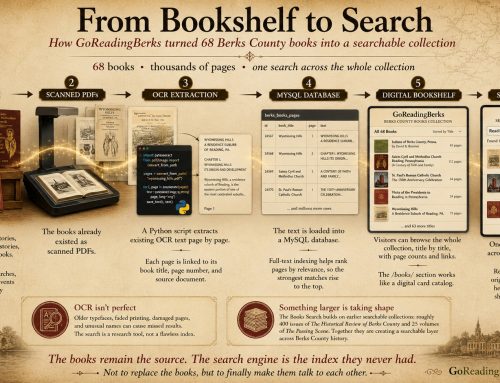
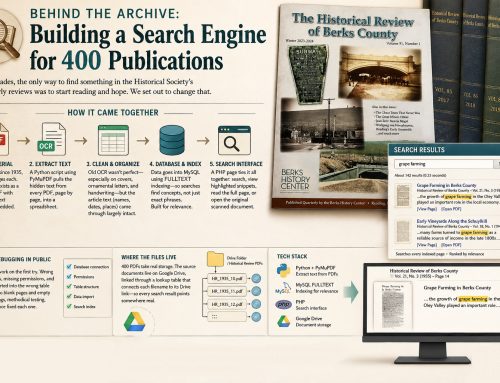
That gap is exactly what GoReadingBerks ran into while building Ask GoReadingBerks, a tool that lets visitors ask natural-language questions about Reading and Berks County history and get answers pulled straight from thousands of pages of scanned local history books. Solving it meant adding a second kind of search entirely — one based on meaning rather than matching — built on a database called Supabase.
What an embedding actually is
The technology behind meaning-based search is called an embedding. An embedding model takes a piece of text and converts it into a list of roughly 1,500 numbers. That list works like a set of coordinates, placing the text as a single point in an enormous mathematical space — and text with similar meaning ends up as points close together in that space, even when the actual words are completely different.
Embedding space, simplified to two of roughly 1,500 dimensions.
An embedding by itself is just a list of numbers — it isn’t useful until something can store thousands of them and search through them quickly. That’s the job of a vector database: it holds each embedding alongside the original text and whatever metadata needs to travel with it — in this case, every page’s book title, page number, source file, and collection.
Why Supabase, specifically
GoReadingBerks’ vector database runs on Supabase, built on top of Postgres — one of the most established relational databases in existence, the same general category as the MySQL system GoReadingBerks already runs on InMotion. Rather than a specialized product with its own unfamiliar query language, Supabase adds vector search to a database that already does everything a normal database does, through an extension called pgvector.
-
1
Ordinary SQL, extended.
A new column type holds each page’s embedding, and a single SQL function finds the closest matches to any new question — no separate query language to learn.
-
2
Scale matched the free tier.
The archive comes to roughly 12,000 embeddings — comfortably within Supabase’s free tier, so there’s no hosting cost for vector search itself.
-
3
Security by default.
Row Level Security is enabled on the table, so only a private key held on the server — never exposed to visitors — can read or write it.
-
4
Room to grow.
Supabase’s Postgres foundation comes with a broader platform — accounts, file storage, auto-generated APIs — available on the same database if the project ever needs it.
Why both kinds of search matter
Vector search is excellent at concepts and paraphrases. It’s weaker at anything that needs to be exact — a specific street name, a precise phrase someone remembers. For those, literal keyword matching is still more reliable. So the two run side by side on every question, and the results get merged — the precision of keyword matching, plus the flexibility of understanding what a question actually means.
Two real problems, two real fixes
This wasn’t theoretical. Two specific failures during development are what actually pushed the system this direction.
The fix: a search pass that requires every meaningful named term in a question to appear together on the same page, plus a results cutoff that grows to fit every strong match instead of stopping at a fixed number.
This is the one embeddings solved directly: the question and the answer no longer need to share vocabulary, only meaning.
What visitors actually get
Ask “When was the city of Reading founded?” today, and the tool correctly separates three real historical milestones instead of guessing at one.
“Reading was incorporated in the 1800s.”
Picked one milestone — not even the founding date asked about.
- 1748 — town laid out
- 1783 — incorporated as a borough
- 1847 — incorporated as a city
Three real milestones, each cited to its source.
That’s the actual difference this makes: not a flashier answer, but a more honest one — grounded in what the archive really says, found regardless of which words a visitor happens to use to ask.
GoReadingBerks — preserving and rediscovering the history of Reading and Berks County.




Leave A Comment